What Pro includes, and what stays free
The full list of what Savingy Pro unlocks, what every signed-in person keeps for free, and what happens to your data when Pro or the trial ends.
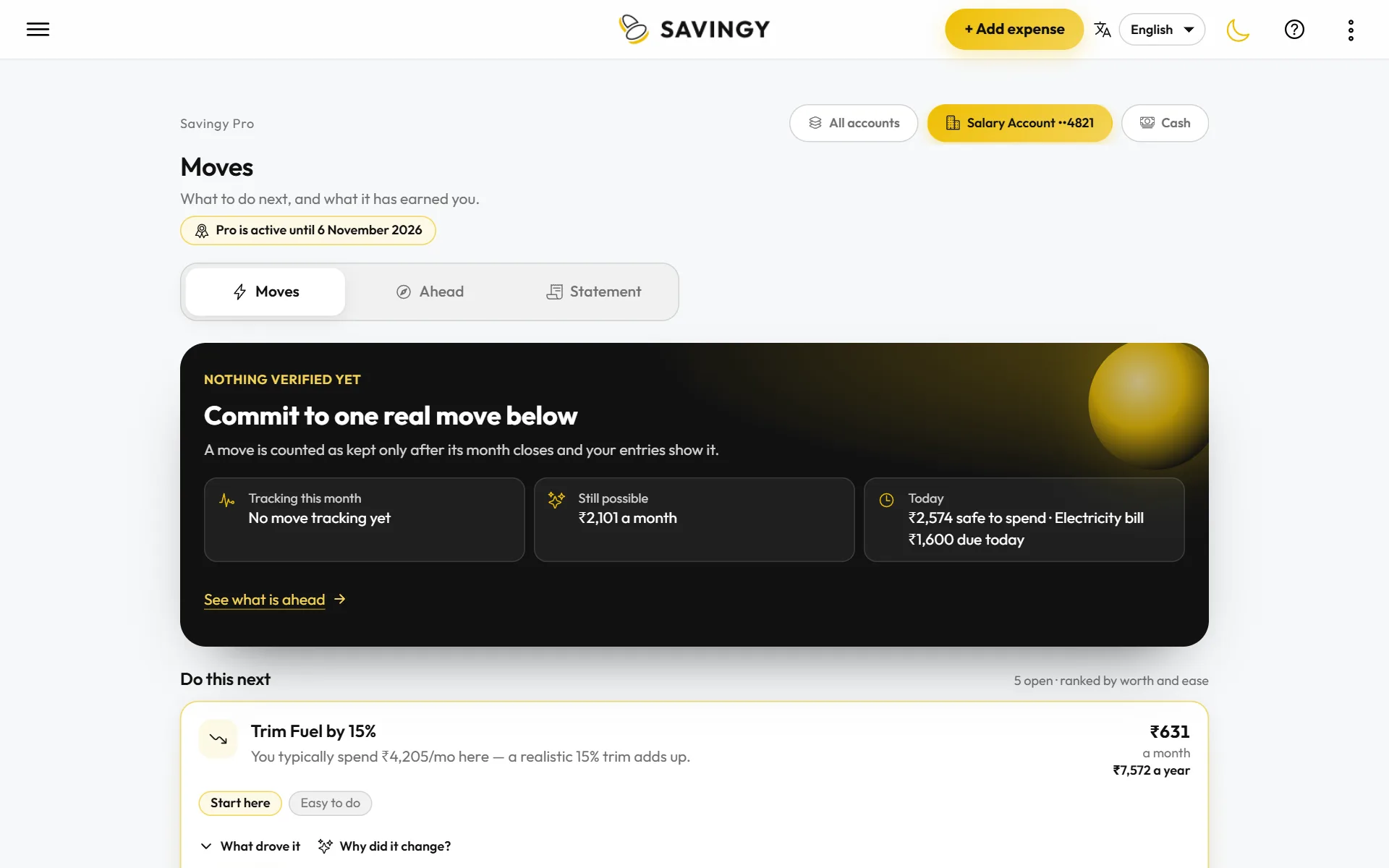
- 1Your Pro status
- 2Switch between Moves, Ahead and Statement
Why use it
So you know exactly what you get before you start the trial or pay, and what you keep if you stop.
How to do it
Open the menu and go to GROW › "Moves". On a phone, tap ☰ ("Toggle Navigation Sidebar") first to open the menu.
Look at the chip under the screen title. It says "Trial · ends <date>" during your trial, "Pro is active until <date>" when you have paid, "Free" if you have never had Pro, or "Pro ended" when your access period is over.
Use the "Moves", "Ahead" and "Statement" buttons at the top to move between the three Pro screens.
To compare plans and prices, open the Pricing page or tap "Compare plans" on any unlock card.
What happens next: You can see your current access and which screens are fully open to you.
Always free, on every account
The free core is never paywalled. None of this needs Pro, a trial or a card.
- Logging expenses and income, without a limit: Add Record, one-line entry, receipts, statement import and the import inbox.
- Tracker and the Money screen: every entry you have ever made, with edit and delete.
- Your monthly plan and budget, goals and contributions, and bill reminders.
- Today, including your safe-to-spend figure.
- Weekly Reset's review and checklist.
- Ask Savingy.
- Recurring purchases.
- Data Management: back up, restore and export all your data.
- Calculators, Research and Analysis articles.
Moves (Pro)
- The full ranked list of money moves found in your own spending, each priced per month and per year.
- "Commit" to a move, "Snooze a month", "What drove it" evidence and "Why did it change?" explanations.
- "Tracking this month" and "Kept": what you committed to and what was verified after each month closed.
- Put a verified month to work toward one of your goals.
- The "Go deeper" tools: Limits, Subscriptions, Better price, Where it drains and Shifts (Compare months and Spending shifts).
Ahead (Pro parts)
- Bill Guardian for the next 30 days, including bills Savingy recognises in your history, price rises, duplicate services and "Tight days" warnings.
- Planning to buy: the purchase planner that prices something you want and turns it into a goal.
- The long view: a five-year forecast from your own income and spending.
Statement (Pro parts)
- The line-by-line Pro receipt for each closed month, and "Save the receipt" as an image.
- Savings movements, the weekly brief ("This week") and the year so far.
Other Pro features
- Reports: a report for any period, with CSV, PDF and print.
- Strategic Planner, signed in: your plan saved to your account and pre-filled from Savingy, the debt payoff planner and plan-vs-actual tracking.
- Digest: money briefings written from your records, "Run Daily Audit", and every premium briefing.
- Voice Quick Log on Add Record.
- Weekly Reset: every leak in the list, not only the first.
- The full set of spending shifts and pacing alerts, with rules and merchant watches.
What you see before you have ever had Pro
Moves, Ahead and Statement still open for you, as a preview built from your own records.
- Moves shows how close you are to the trial ("Add <n> more real entries") or, once you are ready, "Start my 45 days". The biggest move and any duplicate-charge warnings are shown in full; the rest appear as a count and a monthly total.
- Ahead shows safe to spend today, month end at this pace, the runway chart, "Can I afford it?" and Bill Guardian for the bills you added as reminders.
- Statement shows each month in numbers with a health score, and the receipt totals without the rows.
- Spending shifts shows the first shift and one pacing alert.
- Pro-only tools show a locked preview with a way to get Pro instead of the tool.
When the trial or a paid period ends
You go back to Free and keep all your data: entries, budgets, goals, bill reminders and your history of closed months. Nothing is deleted.
Moves, Ahead and Statement show an unlock card in place of the screen, with your own verified results, a choice of 30 or 365 days, "Continue on Free" and "Compare plans". Today still shows your safe-to-spend figure. Digest shows "Your Pro access has ended". Any single article you bought stays readable.
Price and trial
Pro costs ₹149 for 30 days or ₹1,188 for 365 days (about ₹99 a month). These are fixed periods. Nothing renews automatically and there is nothing to cancel. Buying again before your period ends adds the new days after your current end date.
The free trial lasts 45 days. It opens after 30 real expense or income entries (practice entries do not count), with the first thing Pro notices in them, or three weeks later at the latest. It starts only when you choose, needs no card and never turns into a payment. Trial and paid Pro unlock exactly the same features.
If Savingy cannot confirm your status
The Pro screens show "We could not confirm your Pro status" with "Retry status". Everything free keeps working, and nothing is unlocked or offered for sale until your status loads.
Tips and examples
- A move's value counts as kept only after its month closes and your entries show it. The figure on Moves is never a guess about the future.
- Your records are yours on any plan: Statement's "All your data" link and Data Management export everything, free.
If something goes wrong
I paid but the Pro screens still show the unlock card.
See /help-center/payment-taken-pro-locked. Do not pay again; Savingy keeps confirming the payment you made.
"We could not confirm your Pro status"
Tap "Retry status", or check your connection. See /help-center/pro-status-unknown.