Find, commit to and track money moves
Moves ranks the changes worth making in your own spending, tracks the ones you commit to, and shows what you actually kept once each month closes.
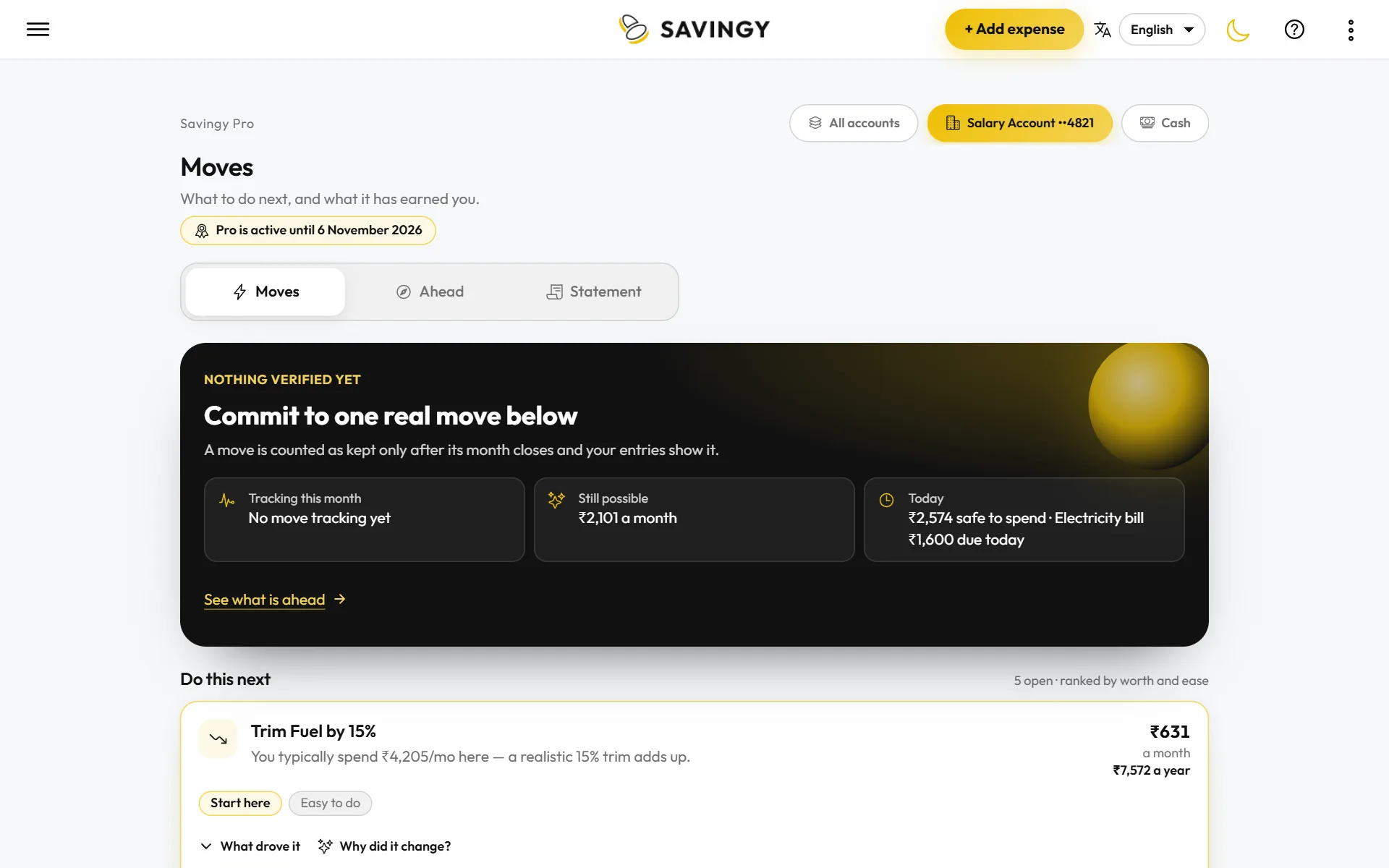
- 1Kept so far, verified from closed months
- 2Do this next: your ranked moves
Why use it
It turns "I should spend less" into one specific change with a rupee value, and then checks whether it happened.
Pro: Before you have had Pro, Moves shows the biggest move and any duplicate-charge warnings in full and the rest as a count and monthly total, plus your progress toward the trial or "Start my 45 days". After Pro ends, Moves shows the unlock card instead. See what Pro includes.
Before you start
- Signed in
- Pro or an active trial
- About a month of real entries before moves appear
How to do it
Open "Moves". The top card shows "Kept so far · verified from closed months", "Tracking this month", "Still possible" and today's safe-to-spend line.
Under "Do this next", read the first move (tagged "Start here"). Each move shows what it is worth a month and a year.
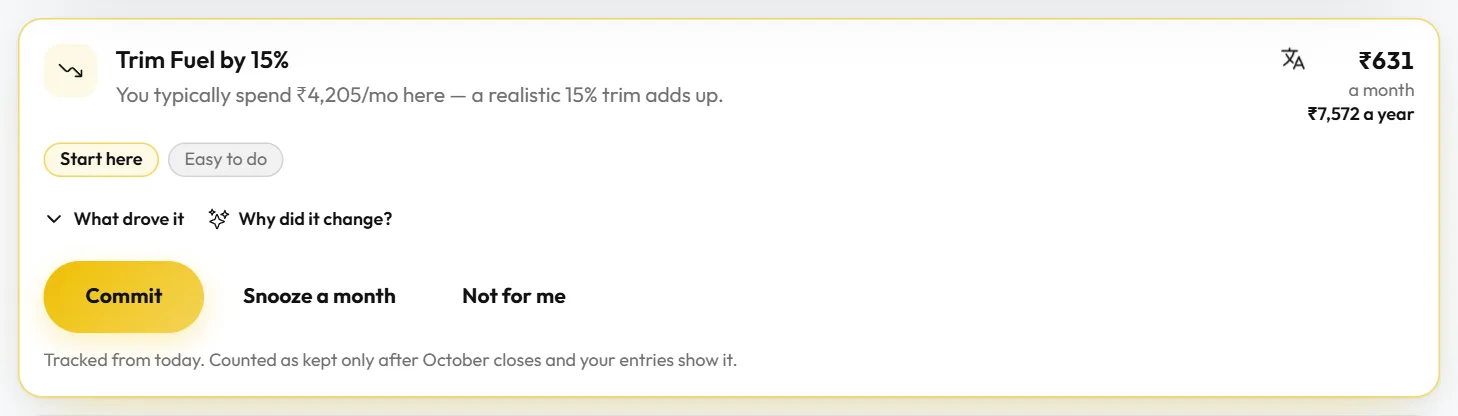
- 1Worth per month and per year
- 2Commit, snooze or hide
Tap "What drove it" to see the amounts behind the move, or "Why did it change?" for a short explanation written from your own entries.
Tap "Commit" (or "I will cancel it" for a duplicate charge) to start tracking it. To decide later, tap "Snooze a month". To hide it, tap "Not for me"; the message that appears has "Undo".
Check "Tracking this month" to see each committed move "on pace". Tap "Undo" on a row if you change your mind.
After the month closes, the result appears under "Kept". Tap a month to open its Statement.
What happens next: The move appears under "Tracking this month" with the message "Committed. Tracking starts today and verifies when <month> closes."
How "kept" is worked out
Only closed months count. While a month is running, a committed move is "tracking", shown as "on pace", and never added to what you kept.
When the month ends, Savingy compares what you actually spent in that category with your usual: the middle value of the three closed months before the move was found. It credits only what your entries show you did not spend. A category is credited once a month, and the total can never be more than your spending actually fell.
A cancelled duplicate charge counts only after a month passes without it. A "Put idle money to work" move counts as wealth added, not savings, and only when matching investment entries appear.
If a move did not stick, Statement says so and offers "Re-arm in Moves". Nothing is invented to fill the gap.
Put a kept month to work
Under "Kept", the latest closed month with a verified amount offers "Put <month>'s ₹<amount> to work". Pick one of your open goals and tap "Move ₹<amount> into <goal>". Savingy records it toward the goal, capped at what the goal still needs; move the money in your bank to match. Each month can be put to work once. If you have no open goal, tap "Create a goal to send it to".
Snoozed and hidden moves
Snoozed moves are listed under "Snoozed (<n>)" with the month they come back. Tap "Bring back" to return one to the list now.
Paid Pro ending soon
In the last week of a paid period, Moves shows a "Keep Pro" card. Buying then adds the new days after your current end date, so no day is lost. During a trial, Moves only tells you when it ends; it never sells over your free days.
Tips and examples
- Use the "Account" selector at the top to look at one bank or cash account, or all of them.
- "Show <n> more" reveals more moves. The list is ranked by worth and ease, with safety warnings first.
If something goes wrong
"No obvious leaks right now"
Your spending is tracking close to your usual. If you are new, Pro needs one full month to learn your usual. Try "Compare your months instead".
"Your moves could not be loaded."
Tap "Try again". If it keeps happening, check your connection and reload the page.
"Only a closed month can be put to work" or "That month is already put to work"
Only a finished month can be recorded toward a goal, and only once. Wait for the month to close, or pick a different month in Statement.
"Nothing verified yet" even though I committed to moves
Committed moves are verified only after their month closes and your entries show the change. Keep logging; the first result appears after the month ends.