Understand Safe-to-Spend Today
The big number on Today is how much you can spend per day for the rest of the month without going past this month's money. Open "see the maths" to check every figure behind it.
Why use it
One daily amount is easier to follow than a whole budget, and it updates as soon as you log.
Before you start
- A plan for this month with income or an opening balance
How to do it
Open Today.
Select "… days left · see the maths" under the big number.
Read "How today's figure is worked out". Each line is a figure from your records for this month.
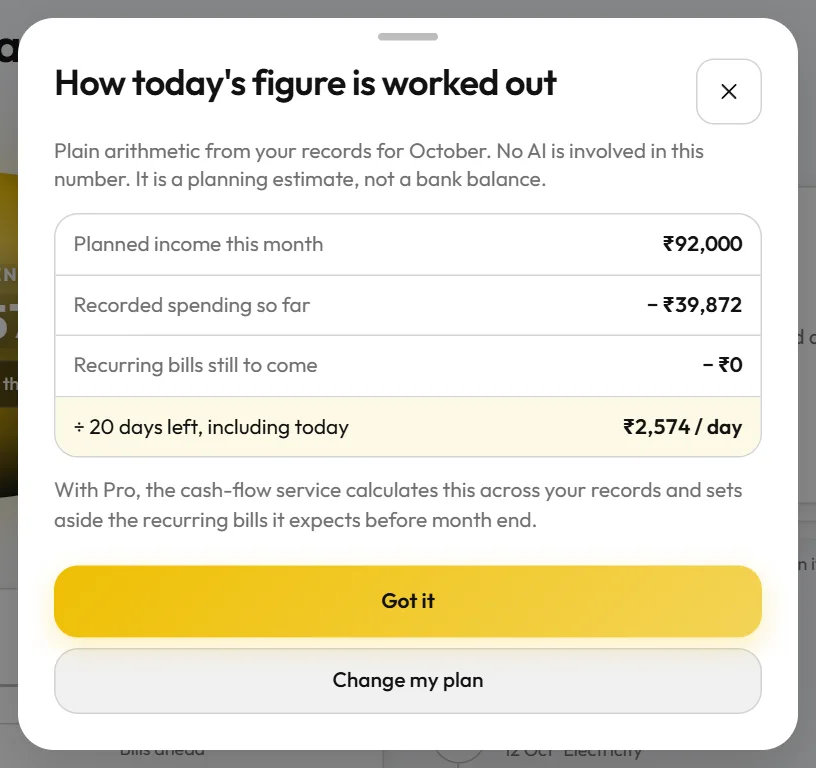
- 1The daily amount, divided by the days left including today
- 2Change my plan
Select "Got it" to close, or "Change my plan" to adjust your plan.
What happens next: You can see exactly which income, spending and bills produce today's figure.
How it is worked out
For example, with a ₹10,000 opening balance, ₹50,000 income and ₹30,000 recorded, ₹30,000 is left. With ₹10,000 of bills still to come and 10 days to go, the figure is ₹2,000 a day.
A bill you pay moves from "still to come" to "recorded", so paying it leaves the figure where it was. An everyday purchase lowers it by its amount divided by the days left.
- Opening balance
- + Income this month (plan or received, whichever is higher)
- − Recorded so far (spending, and money put into savings or investments)
- = Left this month
- − Bills and regular payments still to come
- ÷ days left, including today
One figure everywhere
This is the same figure, worked out the same way, on Today, in your day plan, in Check before you buy, in Ask and in Savingy Intelligence, on Free and on Pro. "Bills and regular payments still to come" are your bill reminders not paid yet this month, the payments you make every month and what is left of a monthly allowance.
When Savingy cannot work out the payments still to come (for example with one account selected that holds only part of your records), the sheet shows what is left this month divided by the days left.
What it is, and what it is not
- No AI is involved in this number. It is plain arithmetic.
- It is a planning estimate, not a bank balance. Savingy is not connected to your bank.
- It counts only real entries on the selected account; practice entries never count.
- When spending is already past this month's money, the figure shows ₹0 and "Prepared for you" tells you how far over you are.
Tips and examples
- Log as you go. The figure updates as soon as an entry saves.
- Add bill reminders so the runway shows what is still due this month.
If something goes wrong
"A clearer day starts with a plan." instead of a figure
Select "Set this month's plan". The figure needs a plan for this month with some income or an opening balance.
The figure looks too high.
Some spending is probably not logged yet, or a different account is selected. Add the missing entries and check the account chips on Money.
The figure looks too low or shows ₹0.
Check for a missing income entry or a wrong opening balance in your plan. See /help-center/numbers-look-wrong.