Act on what Savingy prepared for you
Up to three cards on Today, most important first, each with one action: an overspent month, a bill due soon, a category over plan, a bill Savingy noticed, nothing logged today, or a goal still to reach.
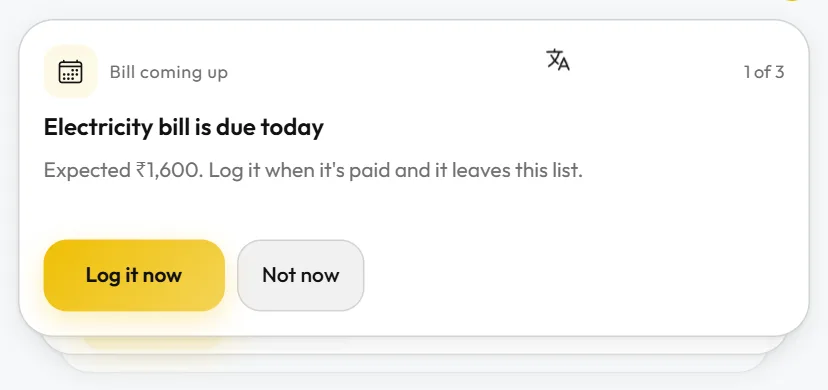
- 1The card's one action
- 2Not now hides it for today
Why use it
The cards turn your records into the next sensible step, so you don't have to look for problems yourself.
Where to find itToday › "Prepared for you" (the right-hand column on a computer).
How to do it
Read the top card. The corner shows its place in the stack, such as "1 of 3".
Select the gold button to act on it.
Or select "Not now" (or drag the card left or right) to set it aside for the rest of the day. The next card moves up.
What happens next: When nothing needs a decision you see "All caught up. Nothing needs a decision right now."
The cards you can get
- "This month" – "You're ₹… past this month's money". "Open Money" helps you find a missing income entry or adjust. This card always comes first.
- "Bill coming up" – a bill reminder due within three days. "Log it now" opens Money with the bill already typed in.
- "Plan check" – a category is over its planned amount. "Review the plan" opens your plan in Money.
- "Looks like a bill" – a payment that repeats in your history but has no reminder yet. "Add as a bill" saves it as a bill reminder, and Today plans for it.
- "Keep it current" – "Nothing logged today yet", shown after 12 noon. "Add an entry" opens the one-line entry box.
- "Goal" – how much is still to go for your nearest goal. "Check it" opens Ask to see whether this month can carry it.
Good to know
- Nothing is sent or paid for you. Every action only opens a screen or saves a reminder.
- A card you set aside comes back the next day if it still applies. Set-aside cards are remembered in this browser only.
If something goes wrong
"That bill did not save. Try again from Reminders."
Add the bill yourself in Goals & bills › Bills (see /help-center/bill-reminders).
Related articles
Was this article helpful?