See your logging habit for the last seven days
A seven-day strip on Today ticks every day you recorded spending, ending with today, next to a shortcut to your Sunday Weekly Reset.
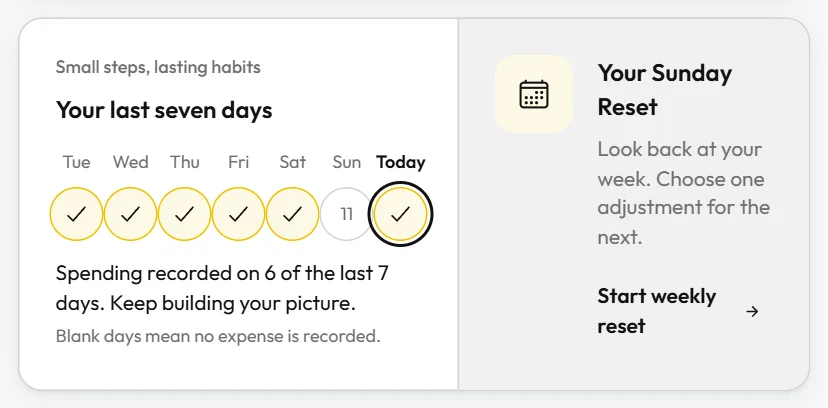
- 1A tick means spending was recorded that day
- 2Start your weekly reset
Why use it
Regular logging keeps your daily figure accurate; the strip shows gaps before they grow.
Where to find itToday › "Your last seven days" (under "Small steps, lasting habits").
How to read the strip
- Each box is one day; the last one is "Today".
- A tick means at least one expense was recorded for that day. A box with only the date means no expense is recorded.
- The line below sums it up, for example "Spending recorded on 5 of the last 7 days. Keep building your picture."
What counts
- Real expenses with an amount above 0. Income entries and practice entries do not count.
- Days follow India time, so a late-night entry stays on the right day.
- Entries dated in the future are ignored until that day comes.
Your Sunday Reset
Next to the strip, "Your Sunday Reset" invites you to look back at the week and choose one adjustment. "Start weekly reset" opens the Weekly Reset.
If something goes wrong
"Recorded activity is unavailable."
Select "Retry activity". If it keeps failing, check your connection.
You logged income but the day has no tick.
Only expenses mark a day. That is expected.
A day you logged shows no tick.
Check the entry's date in Tracker, and that the right account is selected.
Related articles
Was this article helpful?