Set up bill reminders
Keep a list of bills you pay every month, such as rent, electricity or broadband, with an amount and a due day. Savingy counts them in your month-end figures and can suggest bills it sees in your spending.
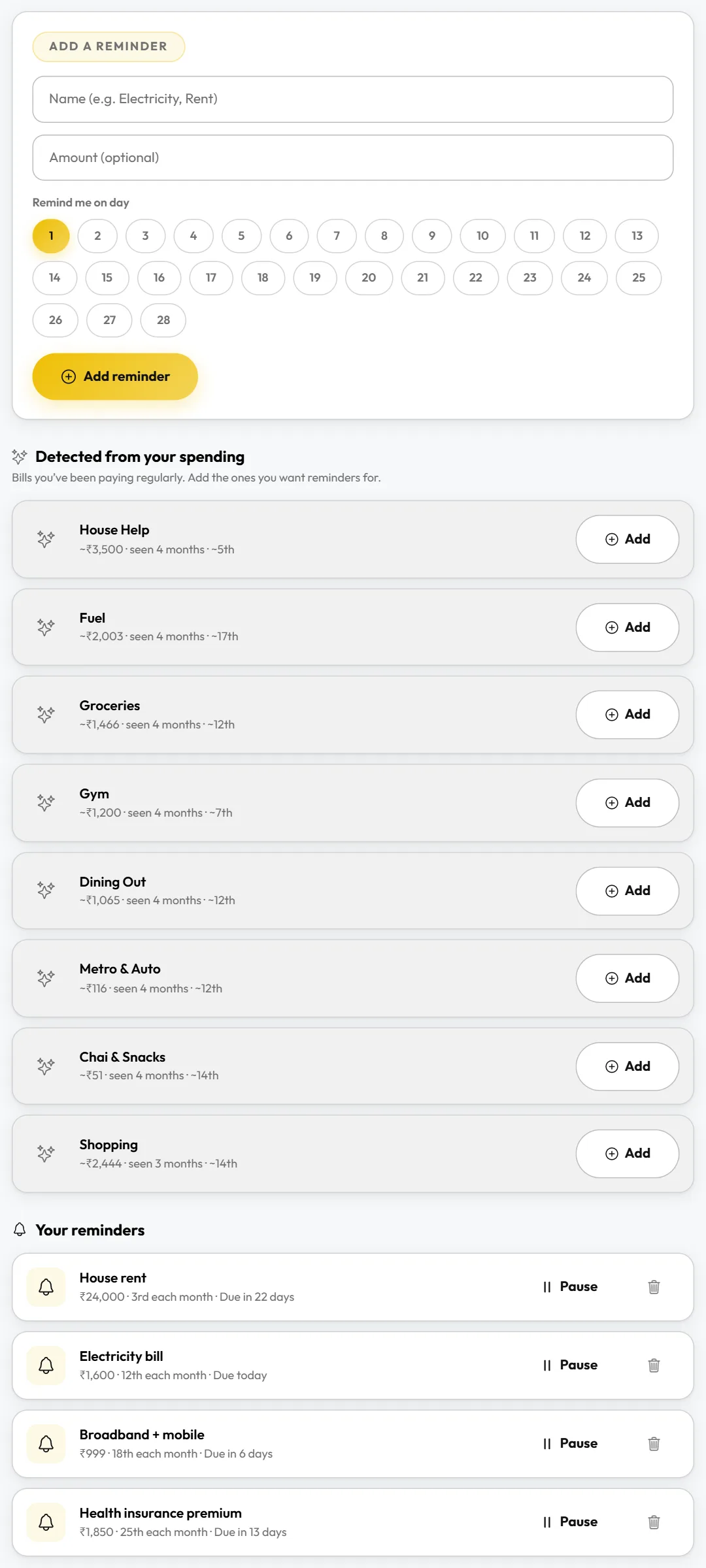
- 1Name
- 2Add reminder
- 3Add a detected bill
Why use it
Bills you have listed are counted in Today's runway, Money and Ask, so a large payment never lands as a surprise.
How to do it
Open Goals & bills and select the "Bills" tab.
Under "ADD A REMINDER", type a name in "Name (e.g. Electricity, Rent)".
Optionally type the usual amount in "Amount (optional)".
Leave "How often" on "Every month". For a cost that comes back every year or few years, see /help-center/save-for-costs-that-come-back.
Under "Remind me on day", tap the day of the month it is due (1 to 28).
Select "Add reminder".
If you see "Detected from your spending", select "Add" next to any bill you want on the list.
What happens next: The bill appears under "Your reminders" with its amount, day and how soon it is due, for example "Due in 4 days".
What to fill in
| Field | What it needs |
|---|---|
| Name (e.g. Electricity, Rent) | Required: "Give the reminder a name, e.g. Electricity." |
| Amount (optional) | Numbers only. Leave it empty if the amount changes. |
| Remind me on day | Day 1 to 28. For a bill due on the 29th to 31st, pick 28. |
Where your bills are used
- Today: the runway to month end counts bills still to come.
- Money: the Bills part lists them.
- Ask: "What bills are still due?" lists them, and every month-end projection in Ask subtracts them.
- The alert itself comes from the Savingy Android app on your phone. The website keeps the list but does not send notifications. See /help-center/install-the-android-app.
Detected from your spending
Savingy looks at your expenses from the last four months and suggests categories or descriptions that appear in at least two different months, up to eight at a time, with the usual amount and day. This is simple grouping of your own entries; no AI model is used, even though detected bills are marked "AI" in your list.
A detected bill you added is switched off automatically if it has not appeared in your spending for 50 days, for example when a loan is paid off.
Pause, resume and delete
- Select "Pause" to stop counting a bill without deleting it.
- Paused bills do not show after you reload the page yet. To bring one back, add a reminder with exactly the same name again; Savingy reuses the old one.
- Select the bin icon to delete a reminder and confirm "Delete the “<name>” reminder?".
Tips and examples
- You can also set a reminder from Ask: "remind me when rent is due on the 5th". See /help-center/ask-about-goals-and-bills.
- Below the reminders, "Recurring purchases" shows what you buy again and again and what it adds up to over a year.
- Rent, ₹24,000, day 3
- Electricity, day 12
- Broadband + mobile, ₹999, day 18
If something goes wrong
"Give the reminder a name, e.g. Electricity."
Type a name before selecting "Add reminder".
"Could not save the reminder."
Check your connection and try again.
A bill I paused is gone.
Add it again with the same name to resume it.
A detected bill disappeared from my reminders.
It had not appeared in your spending for 50 days, so it was switched off. Add it again if it is still due.
I don't get notified on the website.
Alerts come from the Android app. Install it and sign in with the same account.