Edit your budget in the Budget Planner
The Budget Planner ("Edit plan") sets income, opening balance, groups, items, saving, investing and the nightly reminder for any month and account. "All at once" puts every amount on one page with live totals; "Guided" walks you through it step by step.
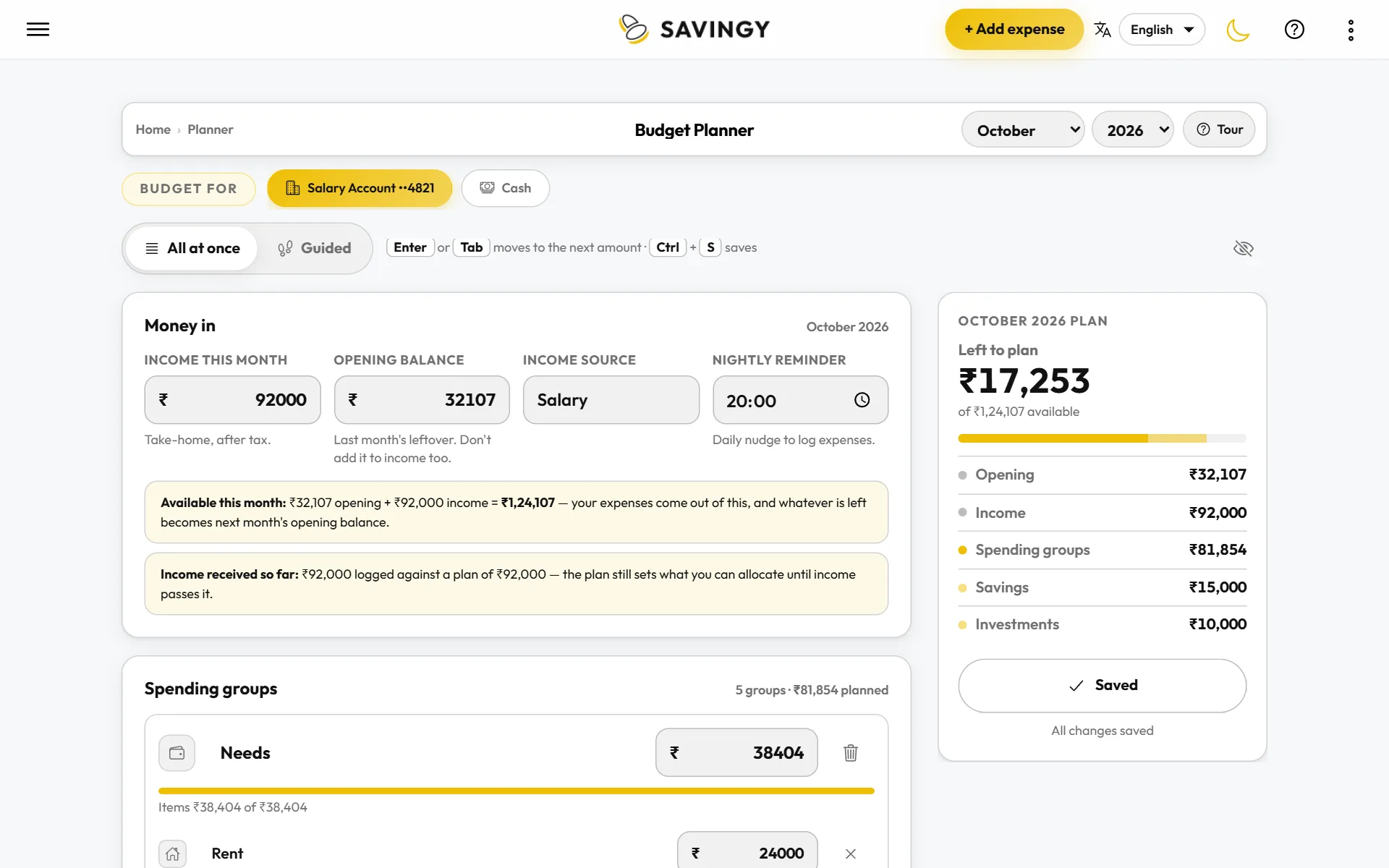
- 1All at once or Guided
- 2Choose the month and year
- 3Change any amount in place
Why use it
Use it for bigger changes the Plan screen doesn't cover: new or renamed groups, the opening balance, the reminder time, or a plan for another month.
Before you start
- You are signed in.
How to do it
Open the Budget Planner. Choose the month and year at the top, and the account in "Budget for".
Pick "All at once" (every amount on one page; the default once you have a plan) or "Guided" (one step at a time; the default for your first plan). Savingy remembers your choice on this browser.
All at once: type over any amount in Money in, a group's limit or an item. Enter or Tab moves to the next amount. Add an item in the "Add an item" row under its group, or a group with "Add a group, e.g. Healthcare".
Watch the summary (on the right on a computer, at the bottom on a phone): "Left to plan", or "Over by" if you've planned more than you have.
Press "Save changes" ("Save plan" for a new month), or Ctrl + S on a computer.
Guided: Income → Allocations → Details → Savings → Review, then "Save My Budget Plan".
What happens next: You see "Saved your … plan." and the summary says "All changes saved". (From Guided's Review you see "Budget saved! Opening your Today dashboard…" and Savingy opens Today.)
What to fill in
| Field | What it needs |
|---|---|
| Income this month / Your Monthly Income | Above ₹0. If nothing comes in this month, enter ₹1 ("Use ₹1"): your opening balance still counts. |
| Opening balance | What the account held at the start of the month. For a new month Savingy fills in last month's leftover: "Carried over from …". Change it if your account says otherwise. |
| Income source | Required: "Give this income a name, e.g. Salary." |
| Nightly reminder | The time Savingy nudges you to log the day's expenses. |
| Group name and limit | Names must be different. A group whose items add up to more than its limit shows "Raise limit to ₹…". |
| Item name and amount | Item names must be different in every group. Adding an item that goes over the group's limit offers "Raise limit to ₹… and add". |
| Savings and Investments | Any amount, including ₹0 if you're not saving or investing this month. Groups plus saving and investing can't be more than your opening balance plus income. |
Copy last month's plan
When the month you chose has no plan but the month before does, the top of the page says "No plan for … yet" with "Copy …'s plan". One tap fills in income, savings, investments, the reminder, every group and item. The opening balance stays the carried-over figure. Nothing is saved until you press Save.
The summary
It shows Opening, Income, Spending groups, Savings and Investments, what is left to plan, and whether you have unsaved changes. The eye button hides amounts. Problems that would stop a save are listed there and next to the field.
Guided steps
The step bar has Income, Allocations, Details, Savings, Review and Trends. Jump to any step, or use "Back" and the next step's name. Review shows how much of what you have is allocated; "Everything available is allocated. You're ready to save." means it adds up exactly.
Trends
"Spending trends" (All at once, at the bottom) or the Trends step charts your spending for 1W, 1M, 6M or 1Y. With no entries yet it says "No trend data yet. Start logging expenses to see your history."
Tips and examples
- Removing an item with × happens straight away; "Undo" in the message brings it back. Removing a group asks "Remove …?" first.
- Leaving the page with unsaved changes makes the browser ask first.
- Press "Tour" at the top for a short guided walk-through.
If something goes wrong
Savingy can't save a plan with ₹0 income yet.
A known server limit for income only (₹0 savings and investments save fine). If nothing comes in this month, press "Use ₹1" under the income field. See /help-center/cant-save-budget.
Allocated exceeds what you have available by ₹… (or Allocated exceeds income by ₹…)
Lower a group, Savings or Investments, or add the money you already hold as the Opening balance.
Enter an income amount, or an opening balance carried over from last month.
Fill in income or the opening balance.
Also in …. Item names must be different in every group.
Rename one of the two items, or remove it.
The fields stay empty when I change month.
That month has no plan yet, or it didn't load. Copy last month's plan, fill it in, or reload the page.