Fix a monthly plan that will not save
If saving your plan shows "All fields are required.", one of planned income, Save or Invest is ₹0. Put at least ₹1 in each and save again.
Why use it
Get your monthly plan saved so Today and Plan can use it.
How to do it
Open Plan and find "Money in and set aside".
Check "Planned income", "Save" and "Invest". If any of them is ₹0, tap it and enter at least ₹1.
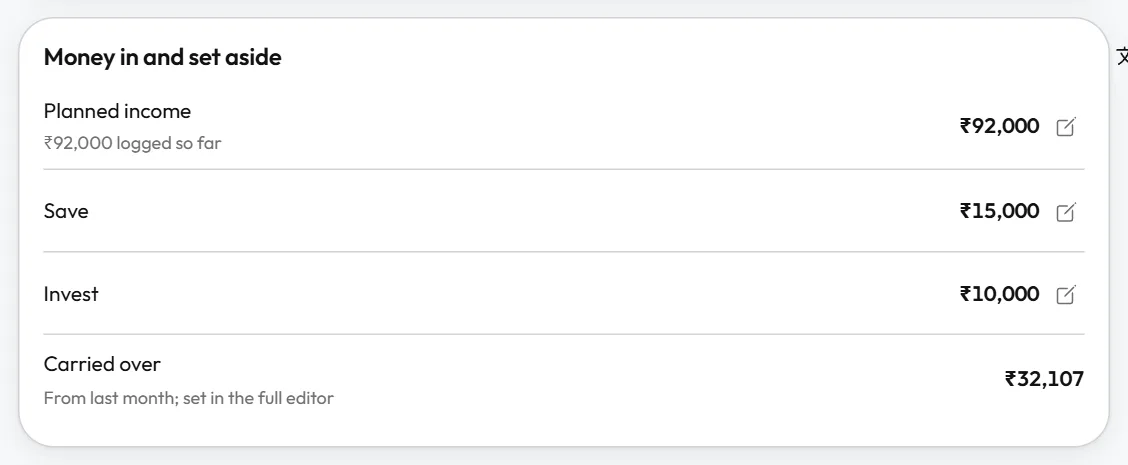
- 1Save
- 2Invest
Save the change you were making again.
What happens next: You see a confirmation such as "Save updated." and the plan keeps your changes.
Why this happens
Savingy currently refuses to save a month's plan when the planned income is ₹0, or when the income has no name, and shows "All fields are required." The full editor (Budget Planner) says so next to the income field before you save and offers "Use ₹1". ₹0 savings or ₹0 investments save normally.
If nothing comes in this month, entering ₹1 as income is enough. Your opening balance still counts.
If you have no income this month
Plan lets you budget from money carried over from last month, but saving still needs a planned income above ₹0. Enter ₹1 as "Planned income" for now.
Other messages when saving
- "Add an income figure, or an opening balance, first." There is nothing to plan with yet. Add your planned income.
- "That plans ₹… more than you have this month. Lower something else first." Your groups, savings and investments add up to more than your income plus carried-over money.
- "Please provide a name for your income." (full editor) Give the income a name, such as Salary.
- "Allocated exceeds income by ₹…" (full editor) Lower a category, savings or investments.
- "Enter an income amount, or an opening balance carried over from last month." (full editor) Add income or an opening balance.
- "The plan did not save. Please try again." Check your connection and try again.
Saving the right account
Each bank or cash account has its own plan. Check the "Plan for" chips at the top of Plan before you save, so the change goes to the account you mean.
If something goes wrong
"All fields are required."
Set "Planned income", "Save" and "Invest" to at least ₹1 each, then save again.
"Failed to save budget. Please try again." in the full editor.
Make sure the income has a name and that income, Savings and Investments are each at least ₹1. If it still fails, check your connection and try again.