Check if you can afford a purchase
Ask "Can I spend 12,000 on a phone?" and Savingy projects what you would have left by month end with the purchase. Slide the amount, try month end or next month, then save towards it, add it to a goal or log it.
Why use it
You see the effect of a purchase on the rest of your month before you spend, not after.
Before you start
- A plan for this month. See /help-center/your-monthly-plan.
How to do it
In Ask, type a question with an amount, for example "Can I spend 12,000 on a phone?", and press Enter.
Read the answer and the projection card. The chip says "Comfortable", "Tight" or "Not this month", and the chart shows what is left each day to month end with the purchase.
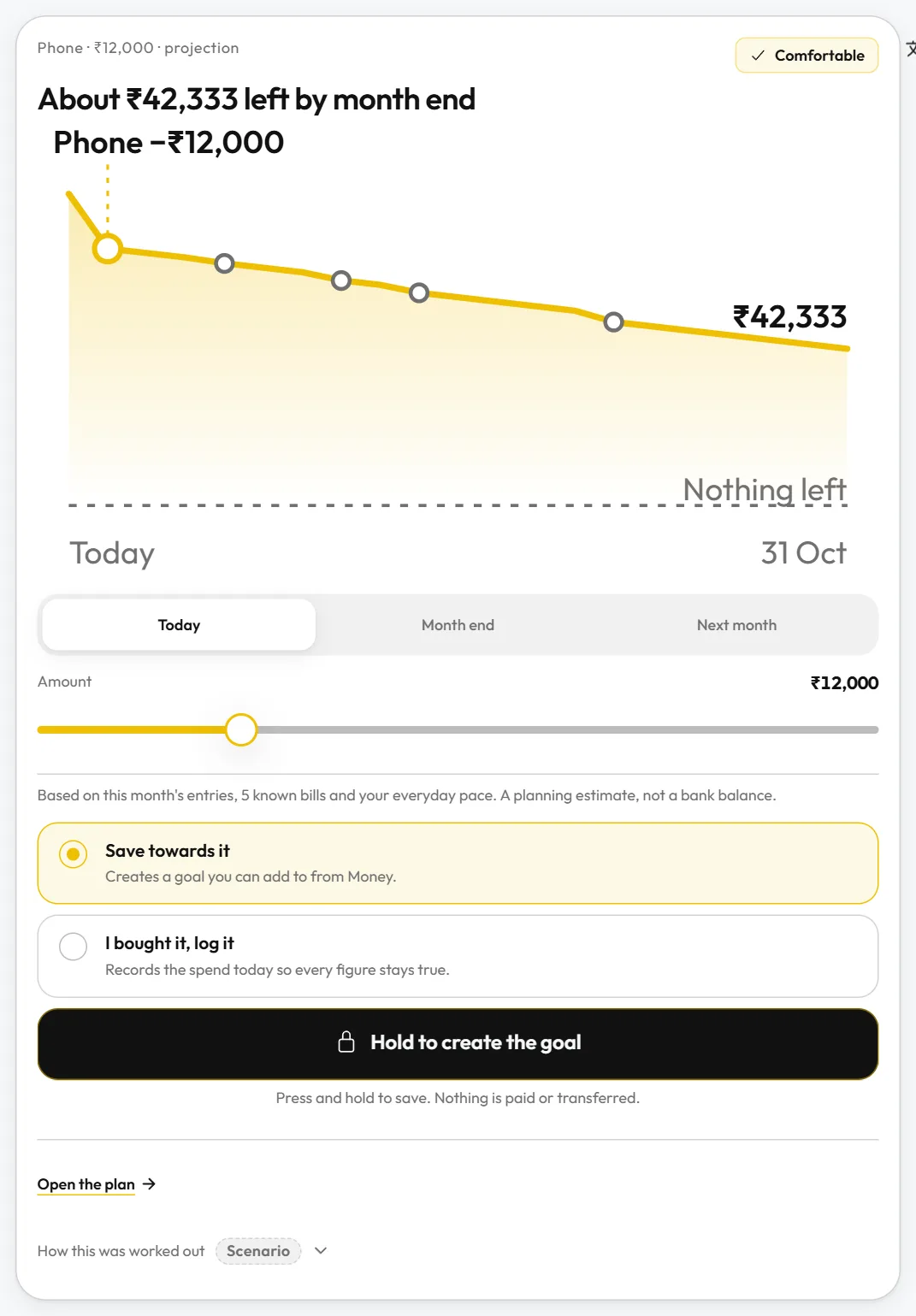
- 1What is left by month end
- 2When: Today, Month end, Next month
- 3Amount slider
- 4What would you like to do?
Drag "Amount" to try a different price, or choose "Today", "Month end" or "Next month" under When.
Choose what to do: "Save towards it" (creates a goal), "Move it to <goal>" (when you named one of your goals), or "I bought it, log it" (pick a "Category" first).
Press and hold the button (for example "Hold to create the goal" or "Hold to log it") to save.
What happens next: You see "Saved." and the card confirms what was done, for example "Goal created: Phone".
How the projection works
Savingy takes what is left of this month's money, subtracts your everyday spending pace for the days remaining, the bills still due from your reminders, and the purchase. "Comfortable" means at least a tenth of the month's money is still spare at month end. It is a planning estimate, not a bank balance. Select "How this was worked out" on the card to see the inputs.
What each choice does
- "Save towards it": creates a goal for the amount, due at the end of this month (or next month if you chose Next month).
- "Move it to <goal>": records the amount on that goal. It does not move money between bank accounts.
- "I bought it, log it": records the spend today. Not offered for Next month.
- Nothing is paid or transferred by any of them.
Tips and examples
- Can I spend 12,000 on a phone?
- can I afford a 3k dinner on saturday?
- can I buy a 25k laptop next month?
- is 8000 for a trip ok at month end?
If something goes wrong
"I need this month's plan first."
Select "Set this month’s plan" and ask again.
"Your month is already stretched."
At your current pace the month ends short even without the purchase. Try Next month, or save towards it.
The answer did not use my goal.
Write the goal's full name in the question, for example "can I spend 45000 on Goa Family Trip?".