Log an expense or income from Ask in one line
Type something like "chai 40 upi" or "salary 85k" in Ask. You get a draft with the amount, category and date filled in; check it and press and hold to save.
Why use it
It is the quickest way to log while you are already in Ask, and you see your new safe-to-spend figure right after.
Before you start
- A plan with categories, so expenses can be placed in one of them.
How to do it
In Ask, type the entry with an amount, for example "chai 40 upi" or "uber 230 yesterday", and press Enter.
Check the draft card: the amount, the name and the "Category". If the category is empty or wrong, choose one from "Choose a category".
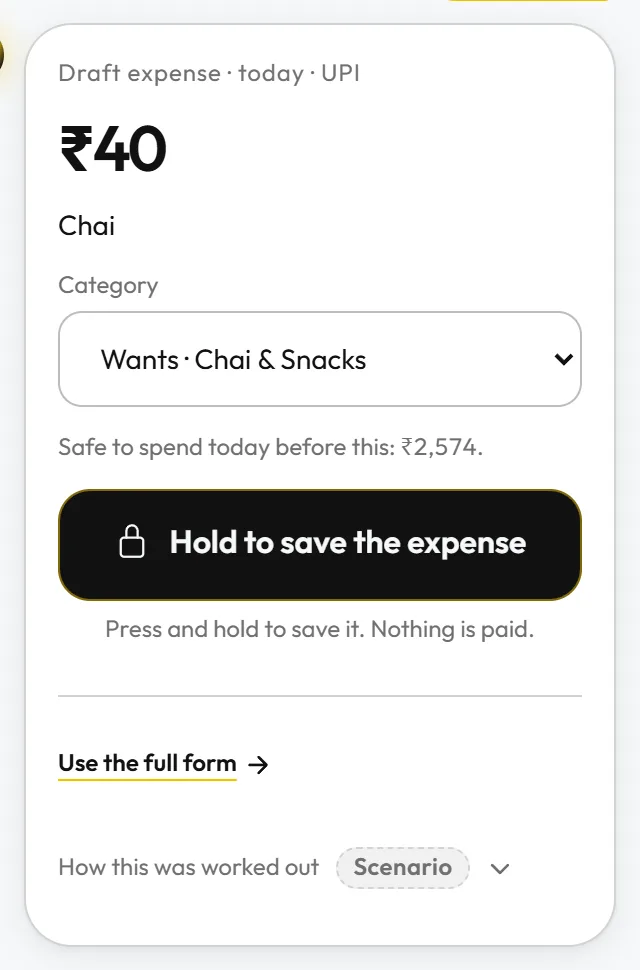
- 1Amount read from your words
- 2Category
- 3Hold to save the expense
Press and hold "Hold to save the expense" (or "Hold to save the income") until it fills, about a second. Letting go early cancels.
To add more detail, such as an account or a receipt, select "Use the full form" instead.
What happens next: You see "Saved." and the card says what was logged, for example "Logged ₹40 under Chai & Snacks", followed by "Safe to spend today is now ₹…".
How your words are read
- The first amount you write is used. "k", "thousand", "hazaar" and "lakh" are understood: "85k" is ₹85,000.
- "yesterday" or "kal" dates the entry yesterday; otherwise it is today.
- Words like "salary", "refund", "cashback", "bonus" or "credited" make it income.
- The category is matched to your own plan's categories by name or common words ("swiggy" or "lunch" to a food category, "uber" to transport).
- If the amount is clear but the category is not, Savingy AI may suggest one of your own categories. The card then shows "Read with Savingy AI". The amount is always one you wrote.
Confirming without a mouse
Hold Enter or Space on the button to save. With a screen reader, activate the button once and then again when it says "Activate again to confirm".
Tips and examples
- chai 40 upi
- uber 230 yesterday
- added 450 for groceries
- salary 85k
- swiggy 320 card
If something goes wrong
"Pick a category so this lands in the right place."
Choose a category in the draft, then hold the button again.
"Add the amount first."
Write the entry again with an amount, for example "petrol 500".
"That did not save. Please try again."
Hold the button again. A retry never saves the entry twice.
Ask answered with a purchase check instead of a draft.
A question ("can I…", or a question mark) is read as a purchase check. Write the entry as a statement: "dinner 1200".