Ask Savingy about your money
Ask opens with how your month is going and answers questions in your own words with cards built from your own records. It can also draft entries, caps, goals and reminders that you confirm before anything is saved.
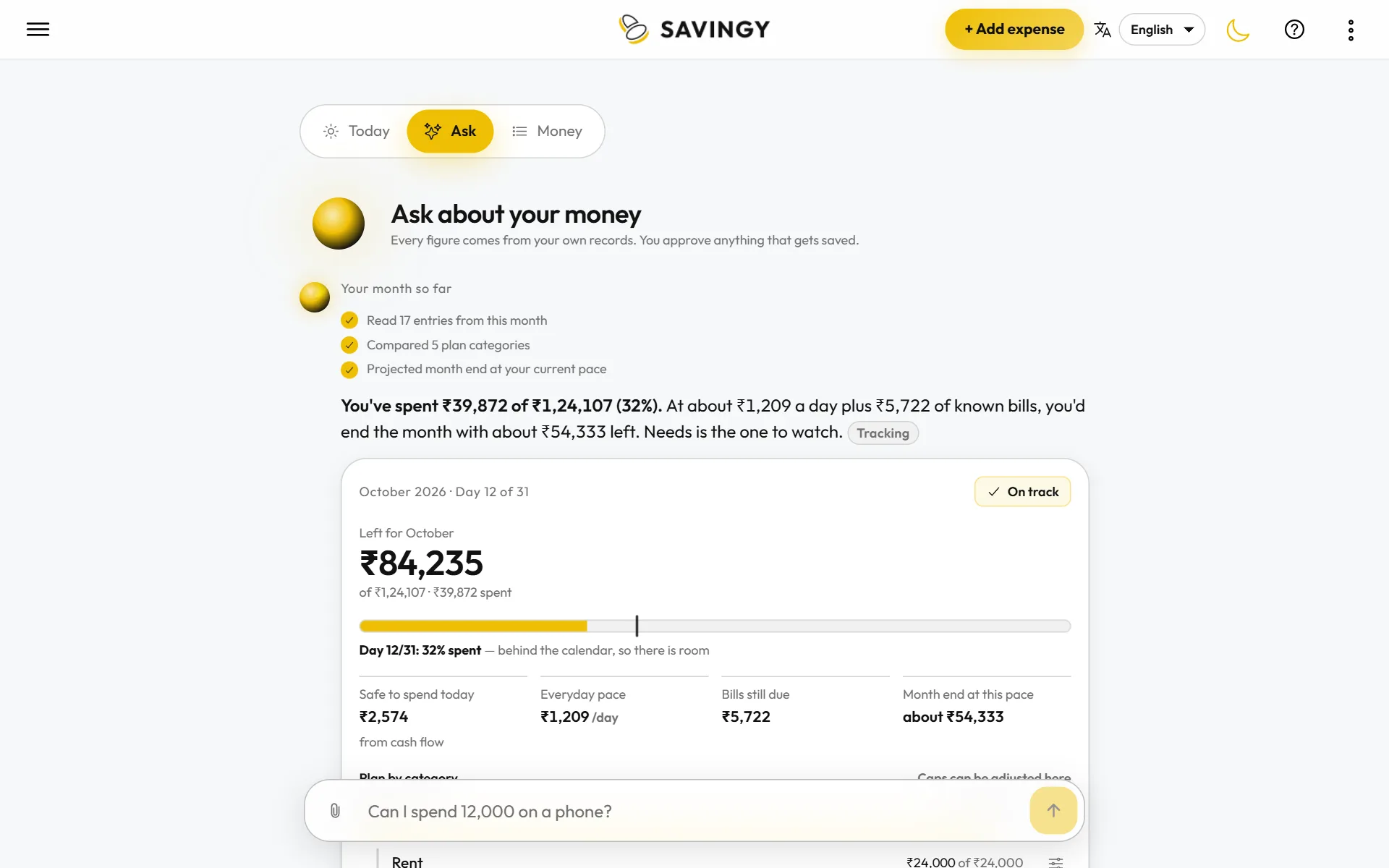
- 1What is left this month
- 2Ask Savingy box
Why use it
One place to check the month, test a purchase or log something quickly, without hunting through screens.
Before you start
- You are signed in and have finished the guided start (Level 0).
- For answers about the month: a plan for this month. See /help-center/your-monthly-plan.
How to do it
Open Ask. The first card, "Your month so far", shows what is left this month, "Safe to spend today", your everyday pace, "Bills still due" and the month end at this pace.
Type a question in the box at the bottom (it suggests "Can I spend 12,000 on a phone?") and press Enter or the arrow button. While Savingy works you see "Reading your records…".
Or tap one of the suggested questions under the latest answer, such as "What changed since last month?" or "Where can I save?".
Act on a card in place: drag a slider, pick a category, or hold a button to save. Links on each card open the related screen, such as "Open the plan" or "See every entry".
What happens next: Each answer appears as a card with figures from your own entries, plan, goals and bills.
What you can ask
- How the month is going: "How am I doing this month?" See /help-center/ask-about-your-month.
- Whether a purchase fits: "Can I afford 8000 for a trip?" See /help-center/can-i-afford-it.
- Where money went, what changed, where to save, money in vs out, finding entries and your accounts.
- Goals and bills: "How are my goals doing?", "What bills are still due?" See /help-center/ask-about-goals-and-bills.
- Logging: "chai 40 upi". See /help-center/log-with-ask.
- Importing a statement: select the paperclip ("Import a bank statement") to open the statement import. See /help-center/import-a-statement.
- Display currency: "show amounts in rupees". This changes only how amounts are shown; nothing is converted.
Keyboard shortcuts
- Press / or Ctrl+K (⌘+K on a Mac) to jump to the question box.
- In an empty box, press the up arrow to bring back your last question.
- Press Esc to clear the box.
Limits
- A question can be up to 500 characters.
- Asking more than about 30 questions in a minute shows "That is a lot of questions at once. Try again in a minute."
- Questions that need Savingy AI to read them have a daily allowance. When it is used up you see "I have read a lot of questions today." Suggested questions, the cards' buttons and common phrasings keep working. See /help-center/how-ask-answers.
- Switching account in the header clears the conversation and starts again with that account's month.
If something goes wrong
"Ask could not answer just now. Every screen still works."
Select Retry. Your other screens are not affected.
"Ask is unavailable right now. Every screen still works."
Try again in a few minutes, or use Today, Money and Plan meanwhile.
"I need this month's plan first."
Select "Set this month’s plan", then ask again.
"I couldn’t read that as a money question."
Tap one of the suggestions, or rephrase about this month, a purchase, your goals, bills or accounts.
"Your records could not be read just now."
Nothing has changed on your side. Try again in a moment.